

Take a look at what’s new from HubSpot's June product updates and releases.
>> Subscribe to our monthly newsletter for more updates like these!
TL;DR - HubSpot's June Product Updates
- Build bespoke, niche intent tracking with Custom Signals
- A cleaner, highly customizable layout on the new CRM Index Pages
- The Prospecting Agent is now unlocked for all paid tiers
1) Turn niche business triggers into hot sales opportunities
>>This feature is available on all hubs and all tiers using HubSpot portal credits.
Generic intent data often leads to false alarms and wasted sales outreach. Your business solves specific, nuanced problems, which means you need to know the exact moment a company experiences that specific pain point.
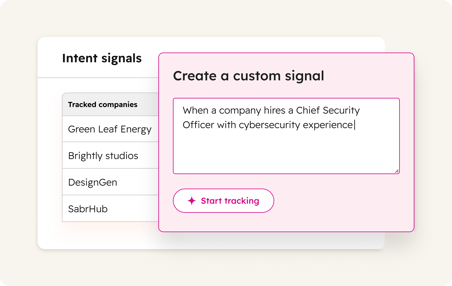
With Custom Signals in Buyer Intent, you can stop relying on generic triggers and completely replace expensive, third-party intent tools. By describing your ideal buyer triggers in plain English, you transform your CRM into an active radar—equipping your sales team with a hyper-specific "reason to call" the exact day a prospect needs you, effectively eliminating cold outreach.
What changed
You can now use natural language to build completely bespoke intent tracking inside HubSpot. Instead of just tracking broad "funding rounds," you can track highly niche triggers—like a company posting a job description for a specific software skill, a school board filing an RFP, or a competitor launching a specific product line.
How to maximize this
- Head to the Buyer Intent App, click the Signals Tab, and navigate to My Signals.
- Type out a sentence describing your dream trigger (e.g., "Companies announcing a new VP of Operations who mention supply chain optimization").
- Review the auto-generated preview companies to verify accuracy, and hit Activate.
- Pro-Tip: Don't just look at the data—automate it. Plug these custom signals directly into your Lead Scoring models or use them as Workflow enrollment triggers to automatically drop a hot account directly onto a sales rep's desk the moment the signal flashes.
2) Drive team adoption with flexible CRM views
>>This feature is available on all hubs and all tiers.
(Reporting insights and Conditional Highlighting are available at Starter+.)
Getting your team to consistently adopt a CRM is notoriously difficult—especially if the interface feels cluttered or requires too many clicks to find basic information. When a system is hard to navigate, data entry drops, and leadership loses visibility.
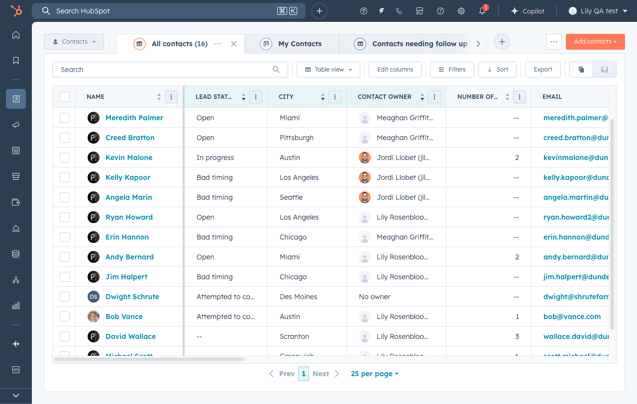
HubSpot’s newly redesigned CRM Index pages fix this adoption hurdle by putting user experience front and center. By streamlining data layouts, allowing instant view customization, and using visual cues to highlight key patterns, this update transforms your CRM from a rigid database into a clean, fast workspace your team will actually want to use.
What changed
All CRM Index pages (Contacts, Companies, Deals, etc.) have received a major layout upgrade designed to help you see more, click less, and act faster:
- Smarter Visual Signals: Use conditional highlighting to color-code rows and instantly spotlight lagging deals, high-value accounts, or urgent customer issues.
- Quick, Native Reporting: No more bouncing to separate dashboards. You can now turn any data table into a full report or zoom into a single column to uncover trends right from the page.
- Instant View Management: Rename, clone, or delete your data views dynamically with inline, in-tab actions rather than navigating deep into back-end settings.
How to maximize this
- Color-code your priorities: Click on your view settings to set up conditional highlighting. For example, set a rule to automatically highlight any deal in red if it hasn't been contacted in 14 days, or green if the deal value is over $50k.
- Clean up your workspace: Use the new inline tab tools to rename or close out old, cluttered views you no longer look at, pinning only your absolute essentials to the top.
- Pro-Tip: If your sales team has been struggling with pipeline visibility, use this update as an opportunity to build a clean, unified default layout. Create a shared, color-coded "Active Pipeline" view for the whole team so everyone stays aligned on the exact status of your revenue.
3) Deploy AI Prospecting across your entire organization
>>This feature is available on all hubs and all tiers including starter.
Finding new business and spotting expansion opportunities isn’t just a task for your outbound sales reps. Marketers need to quickly qualify inbound leads, Customer Success teams need to identify existing clients primed for expansion, and operations teams need to track market movements.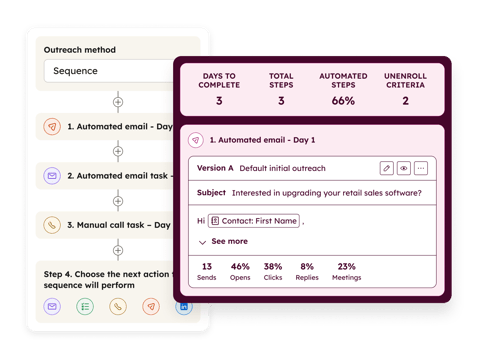
Previously, HubSpot’s powerful Prospecting Agent was locked exclusively behind Sales Hub tiers. This meant other departments either had to buy software seats they didn't need or miss out on automation entirely.
To break down these operational silos, HubSpot has completely removed that gate. Now, any paid account can deploy the Prospecting Agent, allowing your entire organization to use AI to find the right accounts and orchestrate that critical first touchpoint.
What changed
The Prospecting Agent is now unlocked across all paid Hubs (Marketing, Service, Content, Operations, and Commerce).
- Universal AI Assistance: Any non-free portal can now activate the agent to research target accounts and draft personalized outreach.
- Granular Admin Controls: Because access is now company-wide, admins have full control via user permissions to decide exactly who can configure, manage, and execute the agent's workflows.
How to maximize this
Don't let this sit idle just because your team isn't strictly "sales."
- Audit your growth touchpoints: Look at where your team manually researches companies—whether that's Customer Success looking for account growth or Marketing vetting inbound event sign-ups.
- Turn on permissions: Admins can head to User Settings, select the team members who handle these front-line tasks, and toggle on Prospecting Agent access.
- Pro-Tip: Use this cross-hub access to align your Marketing and Sales definitions. Have your marketing or account management teams run the agent to pre-vet accounts before passing them over to a sales pipeline. It ensures that when a deal is finally created, it has a deep foundation of AI-backed research already attached to the record.
4) Unlocking new contact discovery in Prospecting Agent via Seamless
>>This feature is available on all hubs and all tiers
Even with a great AI tool drafting your emails, outbound sales can still ground to a halt if your reps are forced to leave the CRM to scrape lists, guess email addresses, or hunt down decision-makers on LinkedIn.
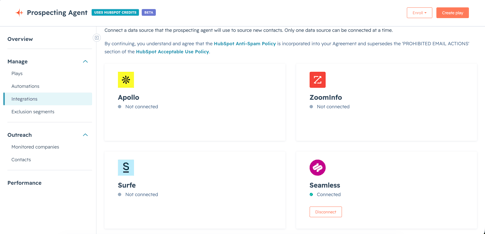
HubSpot’s Prospecting Agent just solved the data-sourcing bottleneck. By natively integrating with Seamless, the agent can now automatically look outside your existing database, find net-new contacts that match your exact target buyer personas, and drop them straight into your CRM alongside a pre-drafted, personalized outreach email.
What changed
The Prospecting Agent can now leverage external database structures directly to scale your outbound efforts:
- Automated Persona Sourcing: The agent actively searches Seamless to find contacts that match your pre-defined buyer personas but don't exist in your CRM yet.
- One-Click CRM Import: Once a lookalike prospect is suggested, you can approve the contact to immediately generate a new record and initialize an AI outreach draft.
How to maximize this
- Navigate to Sales > Prospecting Agent and click on Integrations under the management sidebar.
- Select Seamless from the data source dropdown and connect your account via OAuth.
- Go into your active Prospecting Plays, click Add Personas, and select the exact job titles you want the agent to hunt for. Set your "Daily new contact suggestions limit" to keep your pipeline steady.
- Pro-Tip: Sourcing quality data is the lifeblood of AI automation. While Seamless is fantastic for getting this beta up and running, sophisticated sales teams looking for deeper enterprise-level enrichment, hyper-accurate direct dials, and advanced account mapping should consider connecting enterprise data powerhouses like ZoomInfo to their Prospecting Agent data source. Matching the right data engine to your specific market tier is the secret to unlocking true outbound scale.
Honorable Mentions
1. Skip the Clicks with Actionable Global Search via Breeze Assistant
(Available on all hubs and all tiers)
When you search for a contact, Breeze Assistant surfaces context-rich summaries and immediate, one-click prompts (like "Prepare for meeting" or "Draft a reply") right inside your search results dropdown, saving you from opening the record to start your work.
2. Keep Your Database Clean with Granular Pipeline Property Controls
(Available on all hubs across Professional and Enterprise tiers)
Stage Calculated Properties (SCPs) are great for tracking deal speed, but auto-generating them for every background pipeline clutters your database. You can now toggle these properties on or off for individual pipelines and stages, keeping your portal clean and well under the 4,500-property limit.
3. Manage Creative Identity Faster with Redesigned Brand Settings
(Available on all hubs and all tiers)
The global Brand interface has a clean new layout divided into Brand Kit, Brand Voice, and Brand Knowledge. The new Brand Knowledge tab is where you store the company data, competitor profiles, and ICP info that HubSpot’s AI references to personalize content, making updates effortless.
4. Control Your Data Flow Natively with Salesforce Selective Sync
(Available on all hubs across Professional and Enterprise tiers)
You can now set up rule-based filters directly within HubSpot to control which Salesforce objects sync and which get skipped. This replaces complex workarounds—like custom integration users or back-end sharing rules—giving you full control natively.
5. Run Separate AI Customer Agents for Different Brands
(Available on Professional and Enterprise tiers across all hubs; requires Brands Add-on)
If you manage multiple subsidiaries or products, using a single AI bot is risky. It's too easy for the AI to mix up information or use the wrong brand voice. You can now deploy completely separate AI Customer Agents per brand within a single portal—keeping their personalities and knowledge bases strictly isolated.
Subscribe now to get the latest HubSpot updates and AI features delivered straight to your inbox, or talk to our team for personalized guidance!

Blog comments