

There’s a lot of noise around AI right now.
But most teams don’t know where to start. They assume AI has to be big or transformative, when the first opportunity is in identifying everyday inefficiencies and asking where AI might help, even in small ways.
Teams need their systems to work the way they’re supposed to.
Teams need complete data, automations that fire, and reports they can trust.
And too often, the thing standing in the way is hours of manual data hygiene no one wants to touch.
Below is a small, practical use case of how we at accelant have started using HubSpot’s Breeze AI tools – in this case Data Agent – to help reduce our manual data hygiene efforts.
Why clean data is the foundation of any go-to-market strategy
If you’ve ever tried to segment accounts, launch a targeted campaign, or build a report you can stand behind, you’ve probably run into the same blocker:
Your data isn’t as complete or consistent as you need it to be.
As companies grow, systems evolve faster than the data inside them. Properties get added later, standards change, and over time, things you need to rely on become less reliable than you expect.
That steady decline in data hygiene starts to limit how effectively you can use the tools you’re already paying for to drive results and growth.
At accelant, this surfaced as we began to sharpen our go‑to‑market focus around vertical markets. As we got more intentional about how we segment and analyze our prospects and clients, the quality of our underlying data started to matter a lot more.
Specifically, we rely on two core properties to organize Companies in a way that supports how we segment, analyze, and operate:
- Industry - This is a default HubSpot company property that can be enriched automatically when enough information is available.
- Market - This is a custom property that groups together similar industries into larger categories we call “markets”.
Our system is designed so that once a company’s industry is known, a workflow automatically assigns the company to the appropriate market. This is simple, scalable, and effective.
There was just one problem.

We discovered there were 428 companies in our CRM with an unknown industry, making it impossible for them to be categorized into markets via our automation.
How do you update hundreds of CRM records without doing it manually?
Our first instinct was the obvious one:
“Can HubSpot’s data enrichment fix this?”
HubSpot enrichment does help in many cases, especially when new records are added to the system. But it isn’t foolproof. Sometimes there simply isn’t enough clear information to confidently determine an industry.
When that happens, those records are left incomplete, with no industry, and in this case, no market value.
Our next option?
Manually researching, validating, and updating 400+ company records.
Let’s be honest. No one wants to spend days clicking into company records just to fill in missing data properties.
And more importantly, no one should have to.
Using AI to replace manual CRM data work
At a certain point, the benefits of manual data hygiene stops being a beneficial tradeoff to the time lost doing it.
Instead of asking: “How do we find the time to get this done?”, we asked a different question:
“Is this something AI can handle with low risk and high confidence?”
This wasn’t a mission-critical, high-stakes project for our company. We were simply missing publicly available company data points in our CRM.
That made it a perfect candidate for a low-risk test of HubSpot’s Data Agent, where the upside was clear, and the downside was minimal.
The solution: HubSpot AI Data Agent + smart properties
We built a HubSpot workflow that used Data Agent‑powered smart properties to fill in the missing industry values, without disrupting any other data we already had.
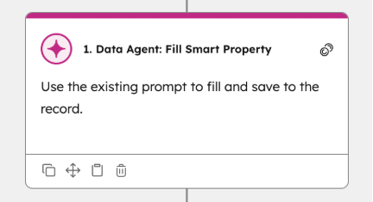
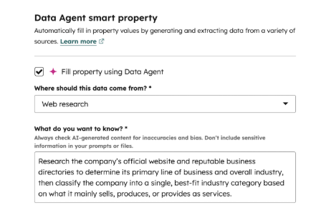
At a high level, the automation did four things:
- Identified all company records where “Industry” data was unknown
- Used HubSpot’s Data Agent to analyze available company data
- Assigned the most appropriate industry value out of HubSpot’s default property values
- Triggered our existing workflow to automatically map company industry → company market
No manual edits. Just automation layered on top of logic we already trusted.
This wasn’t AI making high-stakes decisions.
It was:
- Filling in missing metadata
- Based on existing company information
- Within a controlled set of predefined industry values
If an edge case popped up, it would be easy to review or correct. But the reality? The AI handled the bulk of the work accurately. And it did so instantly.
What would’ve taken days of tedious manual effort was resolved in a fraction of the time.
What “AI That Adds Value” Actually Looks Like
This is just one example of what getting started with AI can look like in practice.
Eliminating repetitive work, improving data quality, and making existing processes scalable.
Most teams need practical automation that fits into the tools they already use, solves real business problems, and works today.
If you’re looking for a place to start with AI, chances are HubSpot’s already got an AI-powered solution hiding in plain sight.
And once you start there, momentum comes naturally.





Blog comments