

Take a look at what’s new from HubSpot's November product updates and releases.
3 Key Feature Call Outs & Mentions
1) Get Full Task Visibility Inside Every Project
The Projects functionality is currently in Public Beta and must be enabled in your Settings to access this feature.
>>This feature is available on all hubs and all tiers.
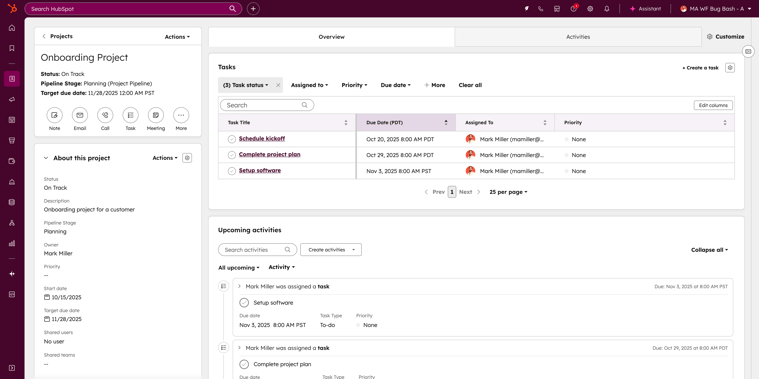
Projects now include a default Tasks card that automatically displays every task associated with that project. If you're new to Projects, it’s a built-in HubSpot tool that helps teams plan and organize work, track milestones, and manage cross-functional execution.
Why focus here? Tasks are the engine behind project completion, but until now there wasn’t a simple way to see all tasks connected to a project without digging. This update removes friction by giving users and project owners an immediate, holistic view of progress, blockers, and workload.
Why Does It Matter?
With the new Tasks card, teams can:
- View all project tasks without jumping between tabs or tools
- Quickly assess progress and identify what needs attention
- Streamline project management for faster execution
- Improve transparency for anyone reviewing or overseeing work
How Does It Work?
The Tasks card appears by default in two places:
- Inside the Project record - in the Overview section
- In the preview panel -when you hover over a Project in the index
If Projects is enabled in your HubSpot portal, the Tasks card is automatically available across your portal with no setup required.
2) Apply Your Brand Identify to HubSpot Email Templates
(Private Beta)
>>This feature is available by request on all hubs and all tiers.
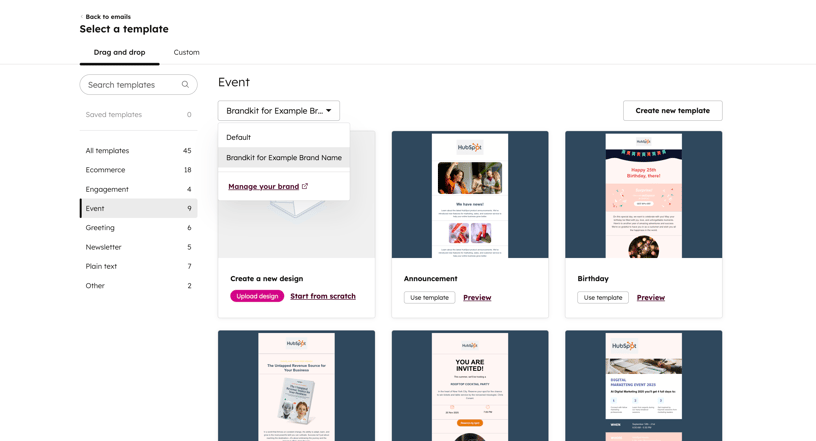
You can now automatically apply your company's brand guidelines—logos, colors, and more—to HubSpot’s default marketing email templates. This makes it dramatically faster to start building polished, on-brand emails without touching every design element manually.
Why focus here? HubSpot’s native templates perform well, but they look generic. Until now, teams had to choose between using templates that didn’t represent their brand or spending hours adjusting colors, logos, and styles one block at a time. This update gives teams a faster, more intuitive starting point so they can build polished, branded emails without the repetitive design work.
Why Does It Matter?
With branded email templates, teams can:
- Apply their visual identity instantly to native templates
- Eliminate tedious manual customization
- Produce consistent, professional emails in less time
- Empower more users to build emails without design bottlenecks
How Does It Work?
- Set up your Brand Kit in HubSpot (logos, colors, fonts).
- Navigate to Marketing → Email.
- Click Create email.
- Choose Regular or Automated.
- Browse HubSpot’s native drag-and-drop template categories.
- Use the new Apply brand dropdown to instantly apply your Brand Kit styling to any native template.
- If you need to update your brand assets, select Manage your brand directly from the dropdown.
- Click Use template to move into the Email Editor and start customizing.
3) Control Merge Permissions Across All CRM Objects
>>This feature is available on all hubs and all tiers.
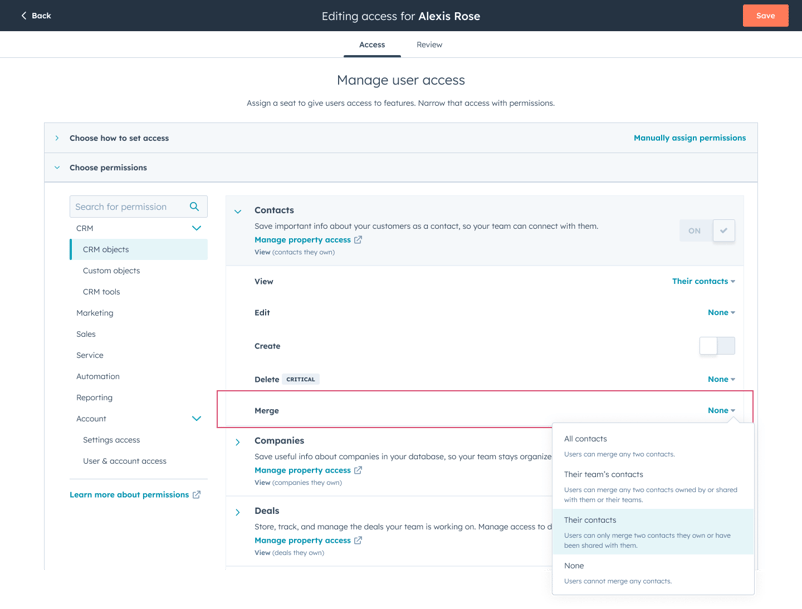
You can now manage merge permissions separately for Contacts, Companies, Deals, Tickets, and Custom Objects. Instead of tying merge access to general edit access, admins can decide exactly who is allowed to merge records for each object type.
Why focus here? Previously, anyone with permission to edit an object could also merge it — even if merging wasn’t part of their role. This made it difficult for teams to maintain data quality while still giving users the edit access they needed to do their jobs. This update gives admins more granular control so data stays clean without slowing down day-to-day work.
Why Does It Matter?
With dedicated merge permissions, teams can:
- Protect data hygiene by limiting who can merge sensitive or high-impact records
- Give users the edit access they need without granting unnecessary merge authority
- Reduce accidental or incorrect merges that create downstream data issues
- Align permissions more closely with real organizational roles and responsibilities
How Does It Work?
- Navigate to Settings → Users & Teams.
- Select a user to edit their permissions.
- Under each object type—Contacts, Companies, Deals, Tickets, and Custom Objects—you’ll now see a Merge permission.
- Set merge access independently (e.g., “All,” “Team,” “Owned,” or “None”) based on the user’s role.
- By default, merge permissions initially match a user’s existing edit permissions, but admins can adjust them at any time.
Honorable Mentions
1. Bidirectional Owner Sync Between HubSpot & Salesforce
(Available Across Pro & Enterprise Tiers)
Owner data for activities, tickets, and custom objects now syncs automatically between HubSpot and Salesforce. This keeps both systems perfectly aligned without manual updates, improving collaboration, automation reliability, and reporting accuracy for teams working across both platforms.
2. HubSpot Connector for Gemini
(Available in Public Beta for all tiers with paid Google Workspace plans)
You can now bring HubSpot context directly into Google Gemini. With the new connector, users can surface CRM insights, pull lists of contacts, companies, or deals, and even generate content—like follow-up emails or notes—that can be actioned back inside HubSpot.
3. SurveyMonkey App: Sync Data to HubSpot Surveys
(Available in Public Beta on Service Pro & Enterprise)
SurveyMonkey responses can now sync directly into HubSpot as native feedback survey and survey response objects. This makes SurveyMonkey data fully usable across Breeze, workflows, reporting, and segmentation—no more buried activity timeline entries.
4. Claude Connector: Update CRM Records & Access Engagement History
(Available in Public Beta on all tiers with a paid Claude subscription)
The HubSpot connector for Claude now goes beyond insights. In Public Beta, Claude can create and update CRM records—including new contacts and deals—and log notes or tasks directly from the chat window, with attribution captured in your HubSpot Audit Log. Bulk actions are supported for up to 10 records per request.
Subscribe now to get the latest HubSpot updates and AI features delivered straight to your inbox, or talk to our team for personalized guidance!

Blog comments