

Take a look at what’s new from HubSpot's February product updates and releases.
>> Subscribe to our monthly newsletter for more updates like these!
TL;DR - February Updates
- Stage duration tracking across objects
- True AND-based lead scoring
- AI reply tools unified under Customer Agent
- Leads searchable globally
1) Pipeline Visibility Across More Objects
>>This feature is available on Professional and Enterprise tiers across Marketing Hub, Sales Hub, Service Hub, Content Hub, Data Hub and Smart CRM.
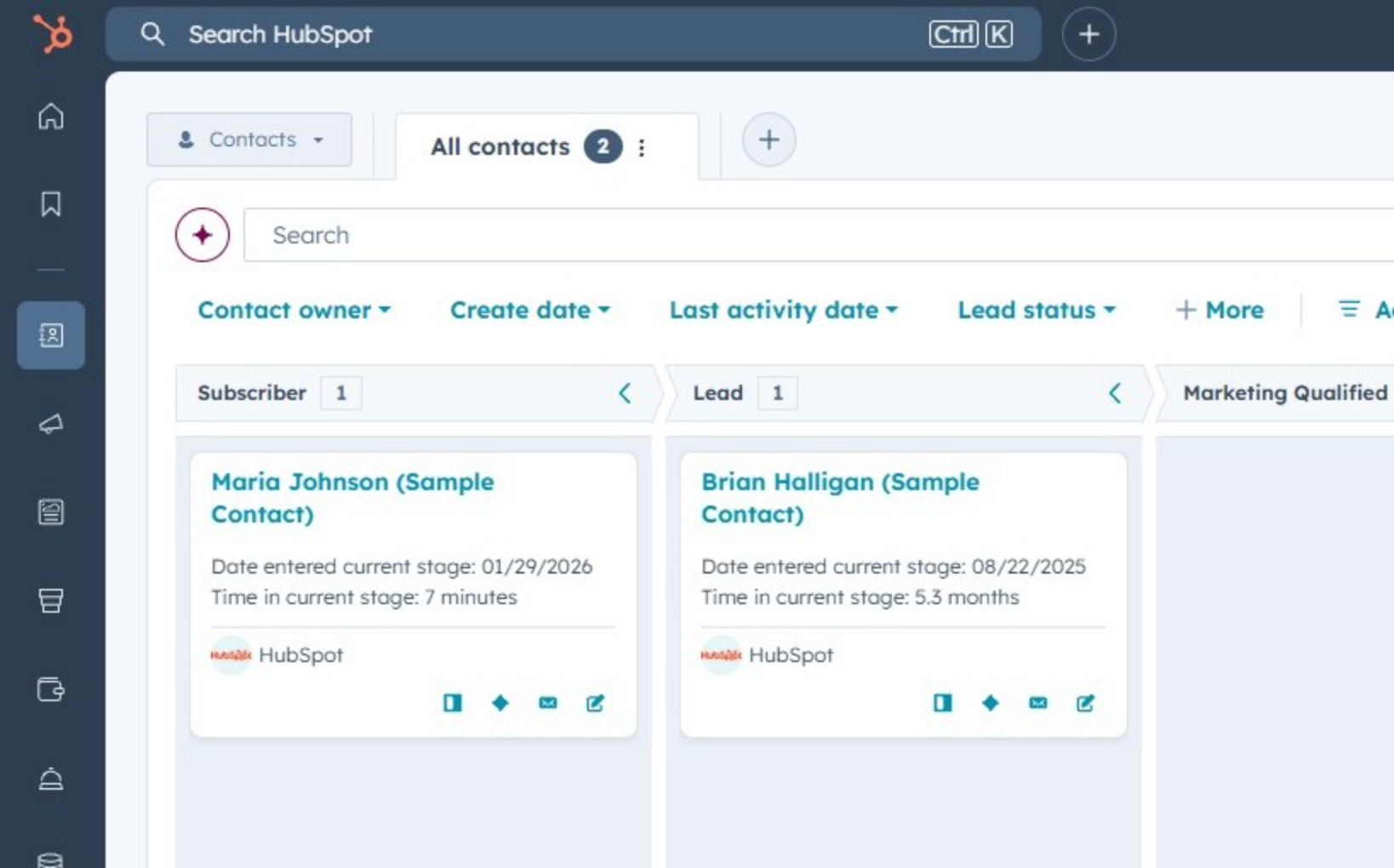
HubSpot just expanded stage tracking beyond deals. You can now automatically track how long contacts, companies, leads, tickets, and services stay in their current stage — making bottlenecks, stalled records, and SLA risks easier to spot in real time.
If you've ever asked:
- "Why are deals stalling?"
- "How long are leads sitting untouched?"
- "Where are tickets bottlenecking?"
You now have native answers — without workflows or manual tracking.
What changed
HubSpot added two calculated properties for contacts, companies, leads, tickets and services:
- Time in Current Stage
- Date Entered Current Stage
These properties automatically update whenever a record moves through pipeline stages. Previously, this functionality was only available for Deals and Projects. It now applies to Contacts, Companies, Leads, Tickets, and Services.
Why it matters
Pipeline visibility is no longer limited to revenue reporting.
With this update, teams can:
- Identify stalled leads before they go cold
- Monitor ticket aging to protect SLAs
- Track lifecycle progression across Marketing → Sales → Service
- Build stage-duration reports without manual workarounds
- Trigger workflows when records sit too long in a stage
This is a big win for RevOps teams and Service leaders.
How to apply this
These properties can be layered into your reporting, filtered into operational views, or used to trigger time-based automation when records stall.
For example, you might alert sales when a lead sits too long in a qualification stage, or escalate tickets automatically when SLAs are at risk. When implemented thoughtfully, this becomes a proactive pipeline management tool rather than just another data point.
If you’re not currently tracking stage aging across objects, this is a strong opportunity to tighten handoffs and improve velocity across teams.
Notes / What to Know
These properties are already available for Deals and Projects.
2) More Precise Lead Scoring With "And" Logic
>>This feature is available on Professional and Enterprise tiers across Customer Platform, Marketing Hub and Sales Hub.
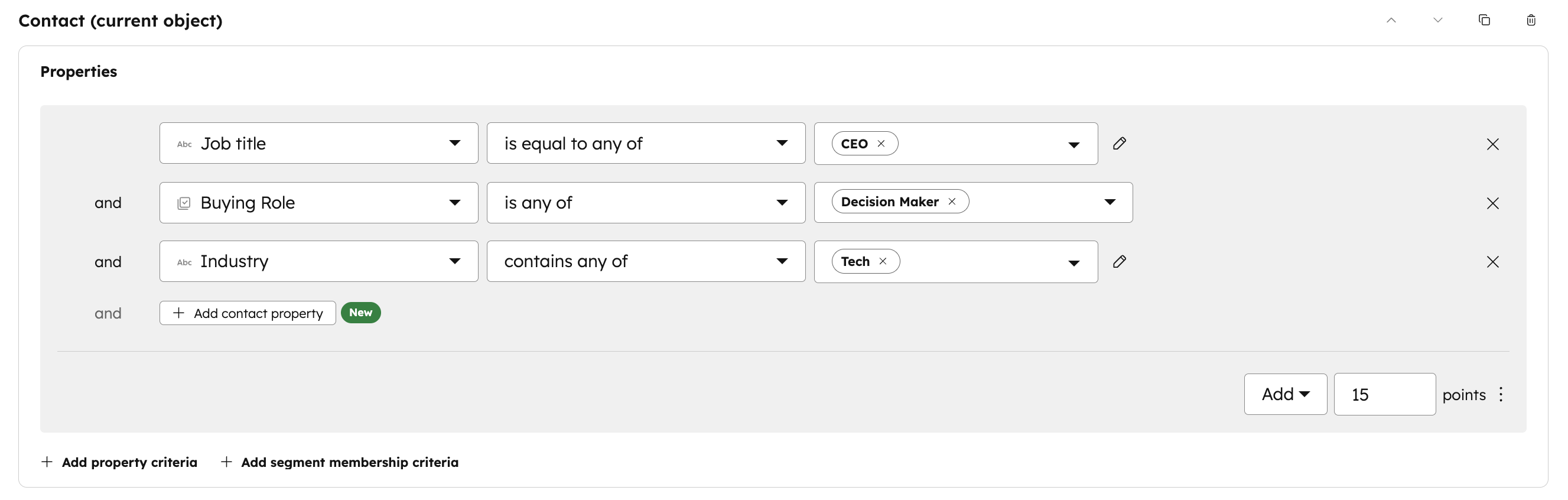
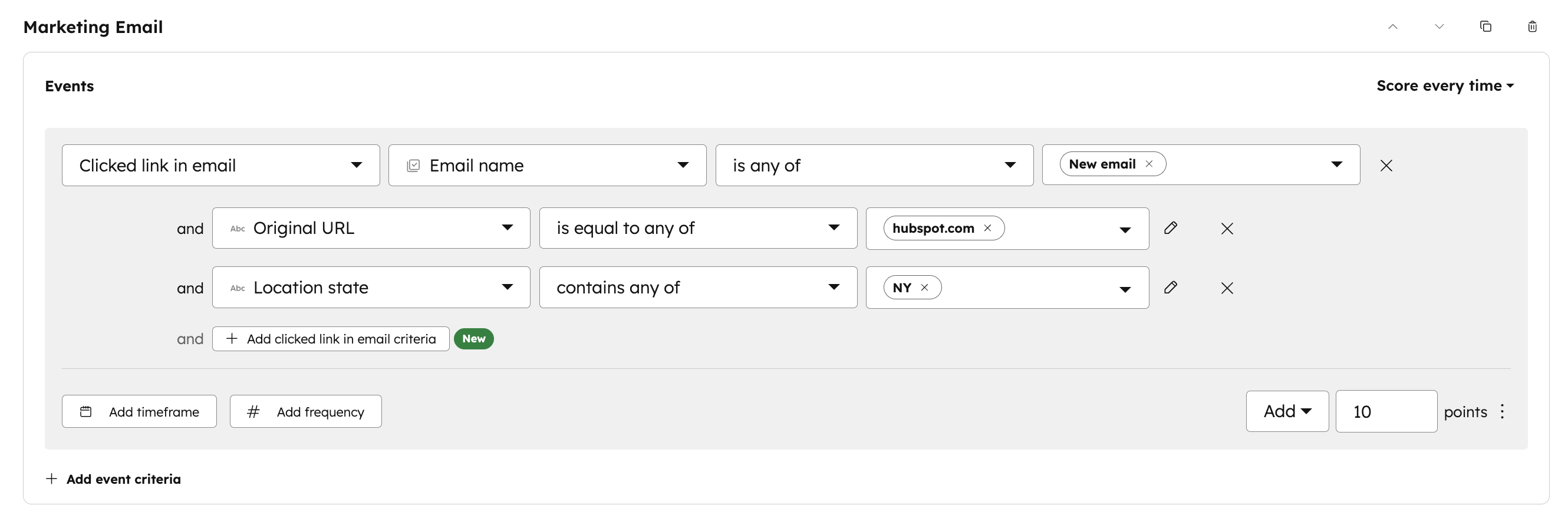
Lead scoring just got significantly more precise. You can now use AND-based conditional logic directly inside HubSpot’s Lead Scoring tool — allowing you to award points only when multiple criteria are met at the same time.
What changed
There are two major enhancements:
-
Fit Scoring (Cross-Property Criteria) Award points only when a contact or company meets multiple property conditions simultaneously.
-
Engagement Scoring (Event-Specific Criteria) Award points only when a single action meets multiple contextual conditions.
Why it matters
More logic = better prioritization. Before this update, scoring rules were limited to single-criterion triggers, which often led to inflated scores and false positives.
Now you can:
- Create more accurate MQL definitions
- Reduce “junk leads” sent to sales
- Score for real buyer intent, not isolated actions
- Align marketing qualification more tightly with sales expectations
For teams struggling with lead quality conversations, this is a meaningful improvement.
How to apply this
Revisit your scoring model and pressure-test it. If your current model feels inflated or too broad, this is a strong opportunity to make it more precise and aligned to how your team qualifies prospects.
Look at where points are being awarded too easily and replace broad criteria with compound logic that reflects real qualification standards. This is especially useful when refining MQL thresholds, improving segmentation accuracy, or tightening automation that relies on score-based triggers.
Small logic adjustments here can significantly improve prioritization downstream.
Notes / What to Know
Segment (List) Membership and Workflow Enrollment are still available for creating complex conditional scoring rules, such as creating conditional scoring rules across two separate events occurring.
3) Reply Recommendations & Customer Agent Are Now Unified
>>This feature is available on Service Hub across Professional and Enterprise tiers.
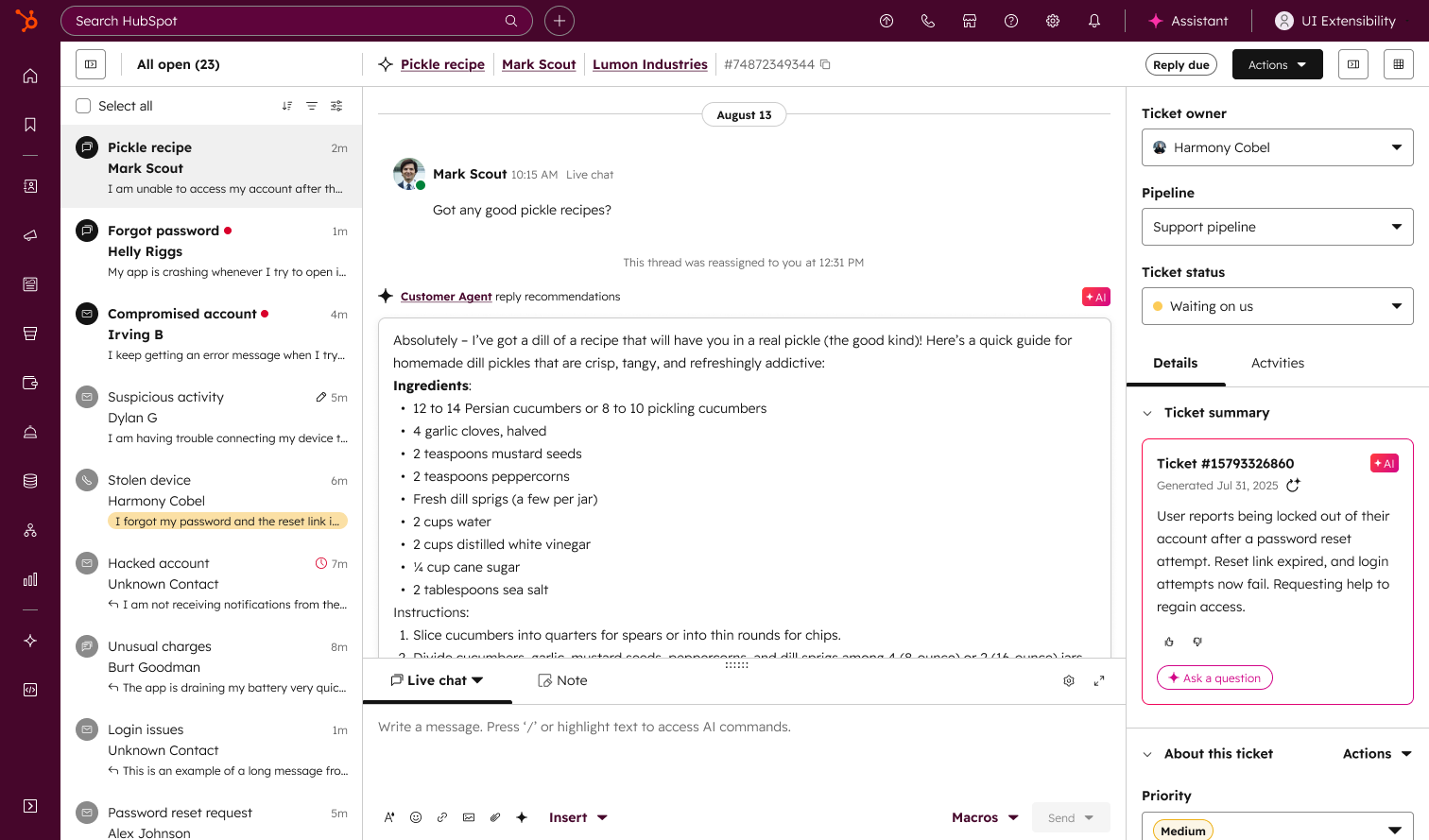
HubSpot is unifying Reply Recommendations and Customer Agent into a single experience — making it easier for support teams to use AI-powered responses while keeping humans fully in control.
What changed
Reply Recommendations are now managed inside the Customer Agent app instead of the Help Desk AI tools tab. The experience has been unified so setup, content sources, and deployment all live in one place.
Why it matters
Support teams want speed — but not full automation.
This update allows teams to:
- Generate AI-powered responses
- Review and edit before sending
- Maintain human oversight
- Improve consistency using shared knowledge sources
- Adopt AI gradually without deploying a fully autonomous agent
It’s a lower-risk entry point into AI-powered support, especially for teams hesitant to launch live chatbots.
How to apply this
Reply Recommendations now live inside Customer Agent, which means support teams should review their current setup before April 20, 2026 to ensure nothing gets interrupted.
This is a good moment to evaluate your knowledge sources, refine tone settings, and decide how AI should support — not replace — your reps. When configured intentionally, this becomes a speed enhancer for your team while keeping quality and control fully intact.
4) Leads Are Now Searchable in Global Search
>>This feature is available on all hubs and all tiers.
Leads can now be found directly in HubSpot’s global search bar — alongside contacts, companies, and deals — making it faster for teams to locate and reference active prospects without switching tools.

What changed
Lead records now appear in HubSpot’s global search results.
When using the search bar in the top navigation, HubSpot will surface matching lead records alongside other objects like contacts, companies, and deals. This brings Leads fully into the same discovery flow as other core CRM objects.
Why it matters
For teams actively using the Leads object, this removes friction.
Instead of navigating separately to find a lead, reps and marketers can:
- Locate prospects faster
- Reference pre-qualified interest more easily
- Move between objects without losing context
- Reduce confusion between contacts and leads
It’s a usability improvement — but one that speeds up daily workflows.
How to apply this
There’s no setup required — but teams actively using the Leads object should make sure reps understand it’s now searchable.
This small shift can reduce friction in day-to-day workflows, especially for teams managing high lead volume. Faster access to lead records means quicker follow-up, cleaner navigation between objects, and less time spent hunting for the right record.
Honorable Mentions
1. Upgraded Social Analytics (Public Beta)
(Available on Professional and Enterprise tiers across Customer Platform and Marketing Hub)
HubSpot’s Social Analyze tab now includes a refreshed set of ready-to-use reports designed to make social performance easier to understand at a glance. The dashboards roll up key metrics across brand growth, engagement, lead impact, and content optimization so teams can more clearly prove ROI and spot what’s working faster.
Critical Limitation: Historical data begins July 1, 2025 or from the date your social account was connected if later
2. Easier Integration Management in Connected Apps
(Available across all hubs and tiers)
HubSpot rolled out a new centralized Connections Home for managing integrations, plus a Connection Insights view that makes app activity easier to monitor. This helps teams catch broken connections sooner, understand how apps are interacting with CRM records, and stay ahead of issues like expired auth or API limits.
3. Users Page Redesign for Faster Admin Management
(Available across all hubs and tiers)
HubSpot updated the Users page with a modern table experience that makes user management faster and less click-heavy. Admins can now use bulk edits, saved views, customizable columns, and quick filters to manage permissions, statuses, and user properties more efficiently, plus export filtered user lists when needed.
4. Customer Agent 28 Day Free Access
(Available on Professional and Enterprise tiers across Content Hub, Marketing Hub, Sales Hub, Service Hub and Smart CRM)
You can now deploy Customer Agent and get 28 days of free access without using paid credits. This makes it easier to test performance in real scenarios, validate your setup, and decide whether to adopt before committing budget.
Note: Eligibility applies to accounts that have not previously deployed Customer Agent on a channel
Subscribe now to get the latest HubSpot updates and AI features delivered straight to your inbox, or talk to our team for personalized guidance!


Blog comments