

Modern marketing teams juggle an endless stream of work.
Emails go out, ads launch, nurtures run, content drops, events fire, and new priorities stack up every week.
The real challenge isn’t the volume — it’s understanding what all that activity adds up to, and whether it’s creating the impact you expect.
A clear campaign structure creates that visibility. It pulls the work out of scattered channels and into a single view, making performance easier to interpret and impact easier to measure. And once you can see what’s working, it becomes a lot easier to repeat it, scale it, and keep everything moving in the right direction.
What is a HubSpot Campaign?
At its core, a HubSpot Campaign is a single place to organize, execute, and measure all the assets and activities tied to a specific marketing initiative. Instead of tracking emails, ads, landing pages, and social posts separately, Campaigns centralize everything so marketers can see performance and impact holistically.
Beyond being a “container”, HubSpot Campaigns help GTM teams bring structure and visibility to multi-channel work. They keep strategy and execution connected, ensure teams operate from the same context, and make it easier to understand how each piece of the campaign supports the overall goal.
A well-built campaign gives marketers a clear, coordinated way to:
- keep assets organized
- collaborate more easily across teams
- track performance consistently
- understand how marketing efforts contribute to pipeline and revenue
In short, HubSpot Campaigns turn scattered marketing efforts into an organized, measurable GTM motion.
What are campaign assets?
Campaign assets are the content and components you create or associate to support a marketing initiative. These are the emails, webpages, social posts, workflows, and other materials that work together to drive a specific campaign goal. Every associated asset contributes to your campaign’s results, which is why consistent, accurate asset-to-campaign associations are essential for clean reporting.
Examples of campaign assets include:
- Emails
- Landing pages and website pages
- Forms and CTAs
- Blog or knowledge base content
- Social posts
- Ads
- Workflows
- Media files such as images, PDFs, or videos
- Tasks, notes, and campaign briefs
Each asset plays a specific role in the campaign experience, whether it’s attracting attention, driving a conversion, or supporting follow-up and nurture activities. When all of these pieces are linked to the same campaign, HubSpot can measure their collective impact and give you a complete view of performance.
How does HubSpot measure the impact of a campaign?
HubSpot measures campaign impact in two ways: influence and attribution.
These two layers work together to show both who engaged and what that engagement led to.
Influence: Who engaged with your campaign?Influence measures whether a contact interacted with any asset associated to your campaign, which is why proper association is so critical.
A contact becomes influenced when they take actions like:
- Opening or clicking an email
- Viewing a landing or website page
- Clicking a CTA
- Interacting with a paid ad
- Engaging with a social post
- Submitting a form
Influence is binary — a simple yes or no.
A contact either engaged (influenced), or didn’t (not influenced).
Because influence is based on engagement, high-performing assets lead to strong campaign influence.
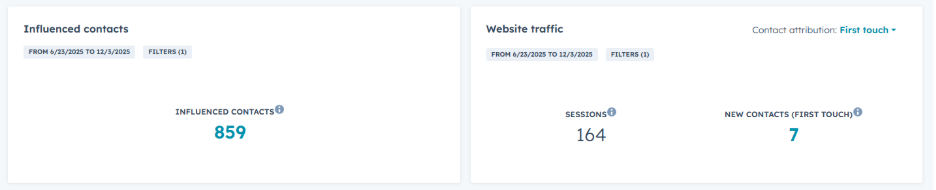

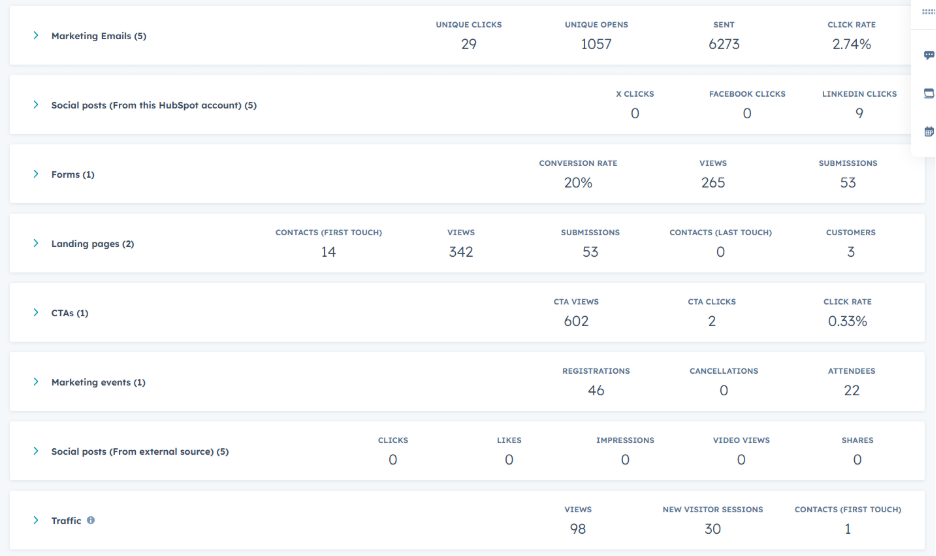
While influence tells you who interacted with your campaign and what they interacted with, attribution focuses on what that interaction actually accomplished. This is where many teams feel friction — attribution is harder to track, more nuanced, and far less binary.
Attribution looks beyond whether someone engaged and instead asks deeper, outcome-focused questions like:
- Did this campaign help create new contacts or deals?
- Did these interactions move opportunities forward?
- Did any of this activity influence closed revenue?
- Which touchpoints made the biggest difference?
HubSpot natively organizes attribution into three main categories:
- Contact create attribution – which assets/touch points created the most new contacts
- Deal create attribution – which assets/touch points helped generate or progress deals
- Revenue attribution – which assets/touch points contributed to closed revenue
These categories help teams understand the downstream impact of campaign engagement across the entire lifecycle, from new leads to pipeline to revenue.
Because customer journeys aren’t linear, attribution isn’t either. HubSpot uses multi-touch models to distribute credit across the different interactions a contact has, so you can see the collective impact of your assets.
HubSpot supports multiple attribution models out of the box:
- First Touch: credit to the first interaction
- Last Touch: credit to the last interaction before conversion
- Linear: equal credit across all touchpoints
- Position Based (U-Shaped): weights first and last heavily
- Time Decay: more credit to interactions closer in time to the conversion
Note: Availability of specific models depends on subscription tier.
This is how HubSpot connects the work marketers create to the results go-to-market teams care about most.

What are common campaign pitfalls?
While campaigns are simple in concept, teams often run into challenges that limit the clarity of their reporting.
Here are the most common issues teams run into:
- Incomplete or late asset association: Assets get created but never added to the campaign, leaving gaps in reporting. And if they’re added late (like associating an email after it’s sent), HubSpot won’t retroactively count earlier engagement.
- Inconsistent naming or structure: When assets or campaigns aren’t named consistently, it’s easy to create duplicates or miss related work. Consistent naming makes assets easier to find and makes it simpler to build reports that compare performance across campaigns.
- Scattered planning across tools: When strategy lives in docs and execution happens in HubSpot, Campaigns become an abyss of assets instead of a true campaign HQ. A unified workflow makes campaigns far more effective (and Marketing Studio will help once fully released.)
- Misaligned goals across teams: Without a shared understanding of campaign objectives, assets are created independently instead of supporting a cohesive initiative.
These issues don’t break attribution outright, but they make campaigns harder to manage and limit the visibility they’re designed to provide.
How is Marketing Studio expected to change HubSpot Campaigns?
HubSpot is currently testing a new Marketing Studio workspace that will eventually introduce a more visual, centralized place to build and manage campaigns.
| Today (Classic Campaigns) | Coming in Marketing Studio |
| Campaigns exist as a list-based, non-visual container | Unified, visualized campaign workspace |
| Assets are created outside the campaign and then associated | Assets can be created inside the campaign canvas |
| Limited visibility into how assets relate or flow together | Canvas, board, and calendar views show relationships and timelines |
| Less collaborative — no real shared workspace | Built for collaboration: comments, shared views, unified planning |
| Association is a multi-step process across multiple tools | Centralized association and creation in a single place |
| Planning often happens outside HubSpot (Docs, Notion, Slides) | Planning moves into HubSpot with project boards and timelines |
| Feels operational and retroactive | Feels strategic, visual, and proactive |
Important to note:
- It is in public beta
- It is not currently available to opt into
- It should be seen as what’s coming, not what’s live
This blog will be updated as Marketing Studio becomes widely available, so your attribution and setup best practices stay accurate.
Why campaigns are worth getting right
Campaigns bring structure to your work, clarity to your reporting, and confidence to your decisions. When your assets live in one place and attribution captures how people engage with them, you finally get a full picture of what’s working. With that foundation in place, it becomes easier to plan smarter, adjust faster, and build campaigns that consistently move the needle.
FAQ
Q: How do I decide what should or shouldn’t be included in a campaign?
Include assets that directly support the initiative’s goal. Leave out evergreen or unrelated assets — clean boundaries make reporting clearer.
Q: What happens if multiple campaigns share the same assets?
Data from an asset can only effectively “live” in one campaign. Even if an asset is associated with multiple campaigns, HubSpot attributes its engagement to the campaign it was associated with first.
Q: How early should I start associating assets to a campaign?
Before launch. HubSpot won’t retroactively count engagement, so build your campaign structure early and associate assets as you create them.
Q: Should every initiative get its own campaign?
If an initiative has multiple assets supporting it, yes — even small ones. Campaigns aren’t just for big launches; they’re a tool for clarity.
Q: How do campaigns support GTM alignment?
They create a shared space for strategy, assets, and performance, giving marketing, sales, and ops a unified view of what’s being promoted and why.
-1.png?height=500&name=accelant%20Blog%20Graphic%20(1)-1.png)


Blog comments